
Grok Imagine Video 1.5 Prompt Guide: Best Practices, Formulas & Examples (2026)
Date: June 4, 2026 (Updated)
Author: Jsam (Klingaio Technical Expert)
Welcome to the next evolution of AI-generated media. While early 2026 was defined by silent physics models like Kling AI 3.0, the arrival of Grok Imagine Video 1.5 by xAI has introduced a major shift in how we create video.
We are no longer just directing silent frames; we are conducting a complete audio-visual symphony.
With Grok Imagine 1.5's Native Multimodal Audio, video tokens and audio waveforms are processed jointly in a single inference pass. This means Foley, dialogue, ambient noise, and physical motion are synchronized directly on the timeline.
After running extensive multi-modal tests and curating community outputs, we have developed the ultimate Grok Imagine 1.5 Prompt Guide. This tutorial provides the exact formulas, troubleshooting workflows, and copy-paste examples to master this new generation of audio-visual AI video. You can test these prompting techniques directly on our Grok Imagine 1.5 Video Generator.
The Paradigm Shift: Focus on Motion, Not Description
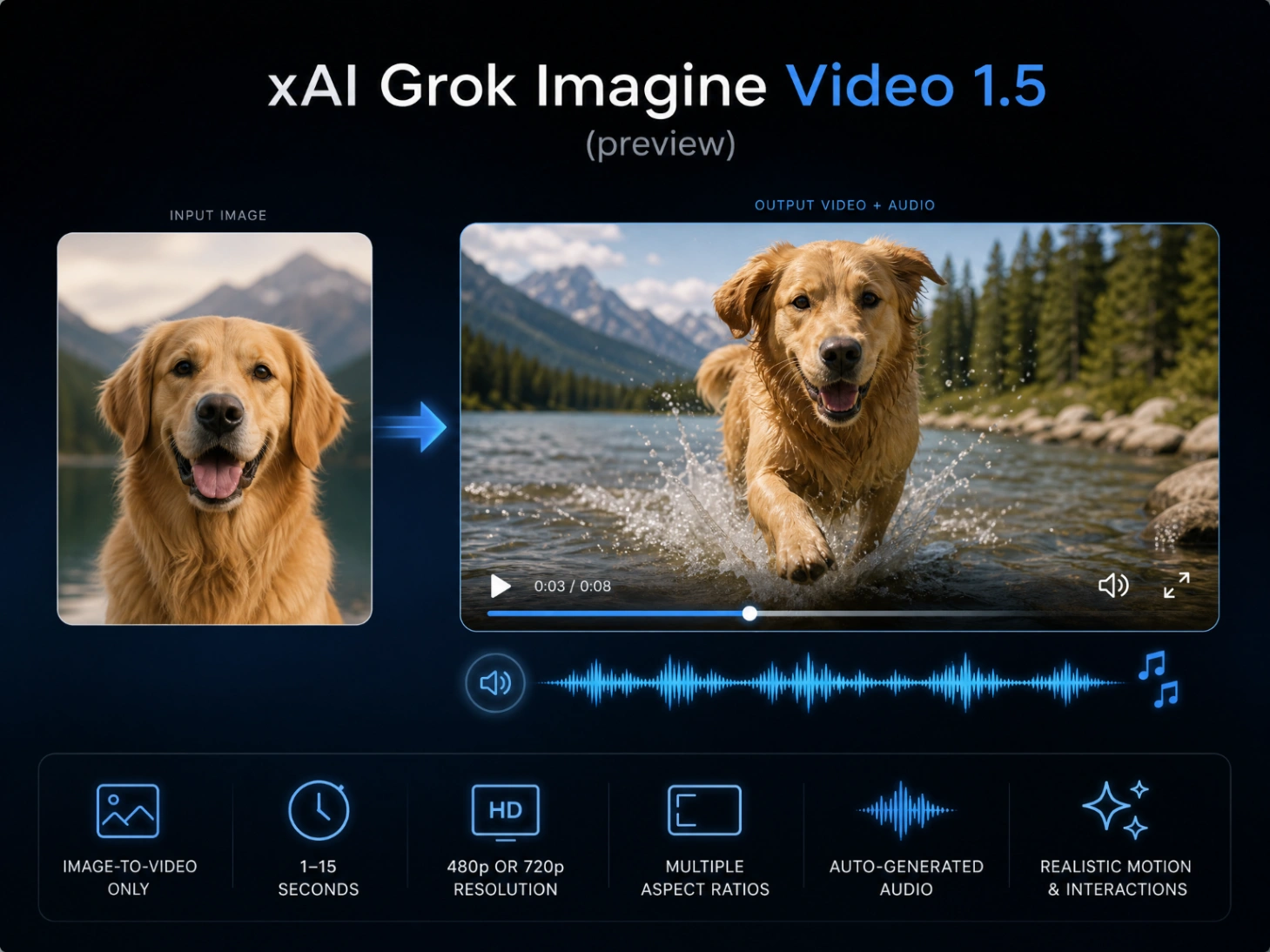
One of the most common mistakes creators make when transitioning from Text-to-Video models to Grok Imagine 1.5 (which is strictly an Image-to-Video engine) is re-describing the starting image.
The Golden Rule of Grok Imagine 1.5: The model already sees your source image. Do not tell it what is in the picture; tell it how what is in the picture should move, interact, and sound.
Because Grok Imagine Video 1.5 operates as an Image-to-Video (I2V) engine, the quality of your video depends on your starting image. We highly recommend using an advanced image generator like GPT Image 2 to establish a highly detailed, photorealistic starting frame before you begin animating.
Core Capabilities of the Model:
- One-Pass Synced Foley: Glass shattering, rain drumming, or car engines revving occur precisely as the action displays on screen.
- Ambient Acoustics: The model understands spatial acoustics (e.g., the reverb difference between a tiled bathroom and an open forest).
- Vocal & Tone Control: Dictate character speech styles, whispers, or dramatic pauses.
- 15-Second Continuity: Render up to 15 seconds of high-fidelity 720p footage at 24 fps in a single pass (though the 5-8 second range remains the sweet spot for visual stability).
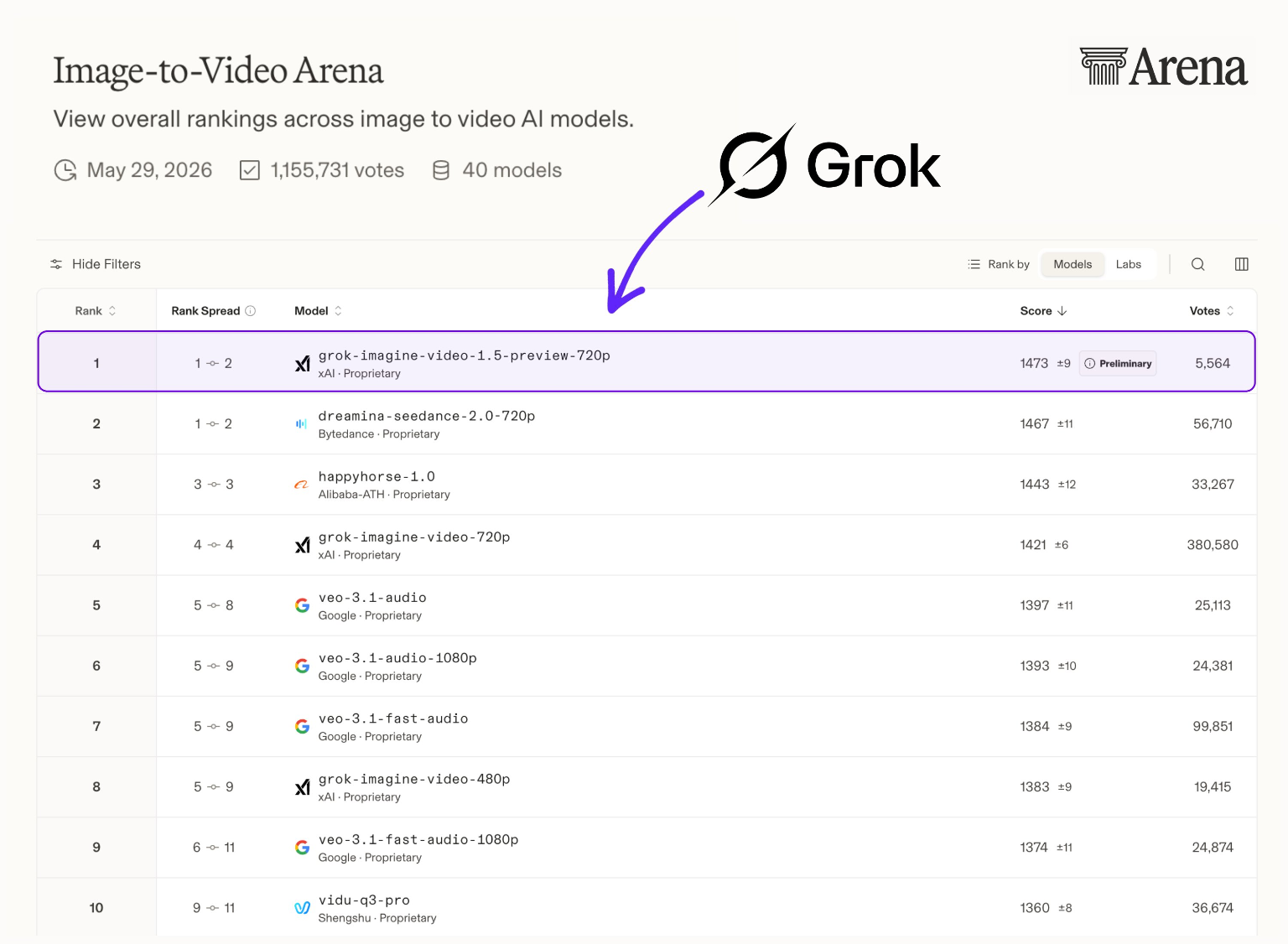
Leaderboard Note: Grok Imagine Video 1.5 Preview currently sits at #1 on the Arena AI Image-to-Video leaderboard, showcasing excellent crowd preference for its native audio capabilities.
The Master Formula: Structuring Your Grok Imagine Video 1.5 Prompt
To get the most out of Grok Imagine Video 1.5, we separate the visual movement from the audio cues using the official AUDIO: parameter at the end of the prompt.
Avoid unstructured tag-stacking (like "epic, 8K, cinematic") which the model largely ignores. Instead, structure your inputs using this layered logic:
[Subject Motion + Intensity Modifiers] + [Camera Movement & Shot Type] + [Lighting & Atmosphere Changes] + AUDIO: [Ambient Noise, Action Foley, Dialogue Directives]
🏆 Featured Snippet: Weak vs. Strong Prompts
Because the model generates audio and video simultaneously, a weak prompt will result in generic, out-of-sync sound effects. Here is how to optimize your prompts:
| Element | Weak Prompt (Don't use) | Strong Grok Imagine 1.5 Prompt (Use this!) |
|---|---|---|
| Visual Action | A blacksmith working on hot metal in a workshop. | The blacksmith swings a heavy iron hammer down onto glowing orange metal with massive force, causing bright sparks to fly outward. |
| Camera | Zoom in | Slow, tense macro dolly-in shot focusing on the impact point of the hammer. |
| Audio | Sound: blacksmith noises | AUDIO: a loud, rhythmic metallic clanging of a hammer, sizzling iron, deep roaring hiss of the forge fire in the background. |
| Acoustics | Realistic audio | Deep reverberation of the hammer clangs echoing within a brick-walled workshop. |
5 Advanced Grok Imagine Video 1.5 Prompt Examples (Ready-to-Use)
Below are five optimized prompt templates designed to leverage Grok Imagine Video 1.5’s native audio-visual logic. Generate your starting frame using GPT Image 2, then input these prompts into our Grok Imagine 1.5 Web App.
1. Cinematic Foley & Atmospheric Physics
Goal: Achieving frame-accurate audio-visual synchronization of physical impacts.
Slow-motion, macro tracking shot of water droplets dripping from a rusty pipe onto a puddle of water. Each droplet impacts the water surface, creating concentric ripples.
AUDIO: deep hollow drip sounds, water splashing softly with high-pitched drops, distant low rumble of a thunder storm echoing outside.
- Why it works: Describing the physical impact ("droplet impacts the water surface") alongside highly specific sound adjectives ("hollow drip", "splashing softly") guides the model to bind the audio waveform to the corresponding video frame.
Input Image (Starting Frame):

Generated Video (With Native Audio):
2. Character Dialogue & Voice Acting
Goal: Utilizing native voice synthesis with accurate mouth movement.
The detective slowly turns his head to the right and speaks directly to the camera, a subtle handheld camera shake adds tension.
AUDIO: a quiet, gravelly whisper: 'We made it. But the clock is ticking.' Faint background paper rustling, low ticking clock.
- Why it works: Standardizing the dialogue input within the
AUDIO:block helps Grok Imagine 1.5 isolate the vocal track and synchronize the lip movements naturally without interfering with the visual animation.
3. Tactile Commercial Product Focus
Goal: Displaying stable text with elegant ambient audio.
The espresso cup rotates smoothly on the pedestal, camera orbiting at eye level, a warm golden hour light sweeping across the surface of the marble countertop.
AUDIO: high-pressure hiss of steam, hot espresso dripping steadily into the cup, gentle clinking of porcelain, soft background jazz.
- Why it works: It combines high-end visual product rendering with ambient sounds to create a complete sensory ad. For strict commercial applications where absolute logo and text preservation is required, you can cross-test your outputs with ByteDance's Seedance 2.0.
Input Image (Starting Frame):

Generated Video (With Native Audio):
4. Suspenseful Sci-Fi Action (Dynamic Audio)
Goal: Generating heavy mechanical sounds synced with high-tech camera movements.
FPV drone shot weaving through a narrow, dark metal corridor of a starship. Red emergency warning lights flash rhythmically. A heavy steel blast door slowly slides shut.
AUDIO: loud, deep mechanical grinding of the heavy steel door sliding, warning sirens blaring, a low-frequency hum of a spaceship reactor core.
- Why it works: The high-velocity camera movement paired with heavy, grinding mechanical sounds tests the model's ability to sync loud sound effects with fast-moving environmental objects.
5. Multi-Shot Narrative & Continuity (15s Best Practice)
Goal: Forcing precise hard cuts at specific seconds while transitioning the audio timeline.
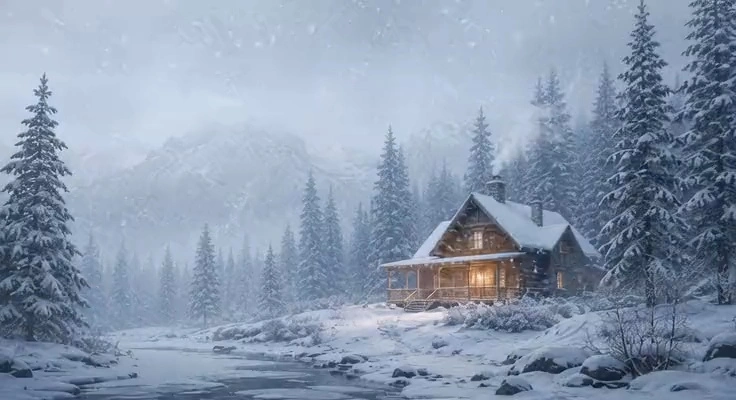
(0-3s) Wide establishing shot of a quiet cabin in a snowy pine forest during a soft winter blizzard.
(3-7s) Cut to an interior close-up shot of a rustic stone fireplace with crackling firewood; then, a hand slowly pours steaming hot tea into a wooden mug.
(7-12s) Cut to an over-the-shoulder shot of a person looking out of the cozy cabin window at the falling snow, smiling gently. Glossy, warm, cinematic.
AUDIO: (0-3s) muffled howling winter wind outside, (3-7s) crisp crackling of a fireplace and a soft liquid pouring hiss, (7-12s) gentle acoustic guitar melody and a soft contented sigh.
- Why it works: Specifying exact time markers like
(0-3s)and(3-7s)tells the transformer engine exactly when to trigger a scene cut and when to shift the sound acoustics. This prevents the classic AI error of blending or "morphing" different shots together.
Input Image (Starting Frame):
Generated Video (With Native Audio):
Troubleshooting: Fixing Common Grok Imagine 1.5 Artifacts
Even with native audio-visual generation, multi-modal pipelines can encounter issues. Here is how to troubleshoot the most common errors:
1. How to Fix Slow-Motion or Sluggish Physical Movements
- The Issue: Grok Imagine 1.5 defaults to highly cinematic, slow-paced motion. Fast physical actions (like martial arts or sports) can feel sluggish.
- The Fix: The model responds strongly to intensity modifiers. Use specific, high-velocity verbs and adverbs to force fast actions. Instead of writing "car passing", write "car racing past at high speed". Instead of "wings flapping", write "wings flapping with massive amplitude". For highly stylized cartoon or hyper-fast animation workflows, you can also explore lightweight, specialized pipelines like Nano Banana Pro.
2. Do Not Use Negative Prompts
- The Issue: You input negative prompts like "deformed, extra fingers, text morphing" to fix visual errors, but the output does not change.
- The Fix: Grok Imagine 1.5 ignores negative prompts. Rather than telling the model what not to do, focus on describing the positive states you want to see.
3. How to Fix Text and Logo Morphing
- The Issue: Since Grok Imagine 1.5 is optimized for fluid, cinematic scenes, small text on bottles or packaging can drift during camera rotations.
- The Fix: If you are running e-commerce or product campaigns that require strict brand consistency, try comparing your results with Seedance 2.0, which excels at detail preservation, or use Kling 3.0 for complex visual consistency.
Conclusion: Stop Rendering Silent Videos
The era of mute AI video is drawing to a close. By mastering the dual-prompting structure of Grok Imagine Video 1.5, you can generate complete, sensory-rich 15-second sequences that require far less post-production.
The key to mastering Grok Imagine Video 1.5 is treating sound as an active participant in your visual physics. Try out these formulas, generate your starting frames on GPT Image 2, and start creating complete, high-fidelity videos directly on the Grok Imagine 1.5 Generator today. Or, if you want to explore different generation options, you can return to our main Klingaio Home page.
Frequently Asked Questions (FAQ)
Q: Does Grok Imagine 1.5 support Text-to-Video?
A: No, the current version is strictly an Image-to-Video (I2V) model. You must upload a starting image to guide the generation. For native, high-motion Text-to-Video, you can use Kling 3.0.
Q: How long can a Grok Imagine Video 1.5 generation be?
A: The model natively supports generations from 1 to 15 seconds, rendering at 24 frames per second (fps). 5–8 seconds is generally considered the sweet spot for visual stability.
Q: Can I disable the audio generator in Grok Imagine Video 1.5?
A: Yes. If you do not include the AUDIO: parameter or any sound descriptions in your prompt, the model will output a standard silent MP4 file.
Q: Is there a free trial for Grok Imagine 1.5?
A: Yes, you can test and generate videos using Grok Imagine 1.5 directly on our web application at /grok-imagine/grok-imagine-15.