
Grok Imagine 1.5 - Top AI Video Generator from xAI
Grok Imagine 1.5 is xAI's most advanced AI video generator. It delivers profound enhancements across audio, consistency, and quality, enabling the creation of more creative video storytelling.
What is Grok Imagine 1.5?
Grok Imagine 1.5 represents the next major step forward in xAI's suite of multimodal AI video and image generation tools; the model was officially released on May 31, 2026. According to the latest test results from Arena.ai, Grok Imagine Video 1.5 demonstrates a significant improvement of +52 Elo points compared to the current 1.0 model. xAI remains committed to implementing various practical enhancements, aiming to empower creators to produce higher-quality videos with greater efficiency.

Major Audio Improvements
The Grok Imagine 1.5 AI model incorporates advanced acoustic generation capabilities to transform silent clips into rich visual media. This update introduces more natural dialogue, ambient sounds, sound effects, and background music, enabling precise synchronization with the generated video content.
Improved Video Extensions and Temporal Coherence
Grok Imagine 1.5 aims to optimize the extend video feature already available in version 1.0. The goal is to reduce quality loss in longer chains, supporting smoother continuity in characters, motion, lighting, and overall scenes.
Advanced Face Accuracy and Character Consistency
Blind testing of the development model has shown substantial gains in face accuracy. Grok Imagine 1.5 is capable of generating more realistic faces, including celebrities, while maintaining strong character consistency throughout video sequences.
Significant Upgrades in Photorealism and Video Quality
Grok Imagine 1.5 delivers significant enhancements in terms of photorealism and overall video quality. This includes better details, lighting, and physical realism to support more professional looking results.
Superior Prompt Adherence
Grok Imagine 1.5 will offer improved prompt following capabilities. This enhancement is designed to handle complex scenes and multi element instructions more accurately, helping users achieve their intended creative outcomes.
Overall Efficiency and Resource Enhancements
xAI is significantly ramping up development resources and performance optimizations for Grok Imagine 1.5. This model features faster generation speeds, enhanced stability, and broader support for reference images, thereby comprehensively elevating the entire video creative workflow.
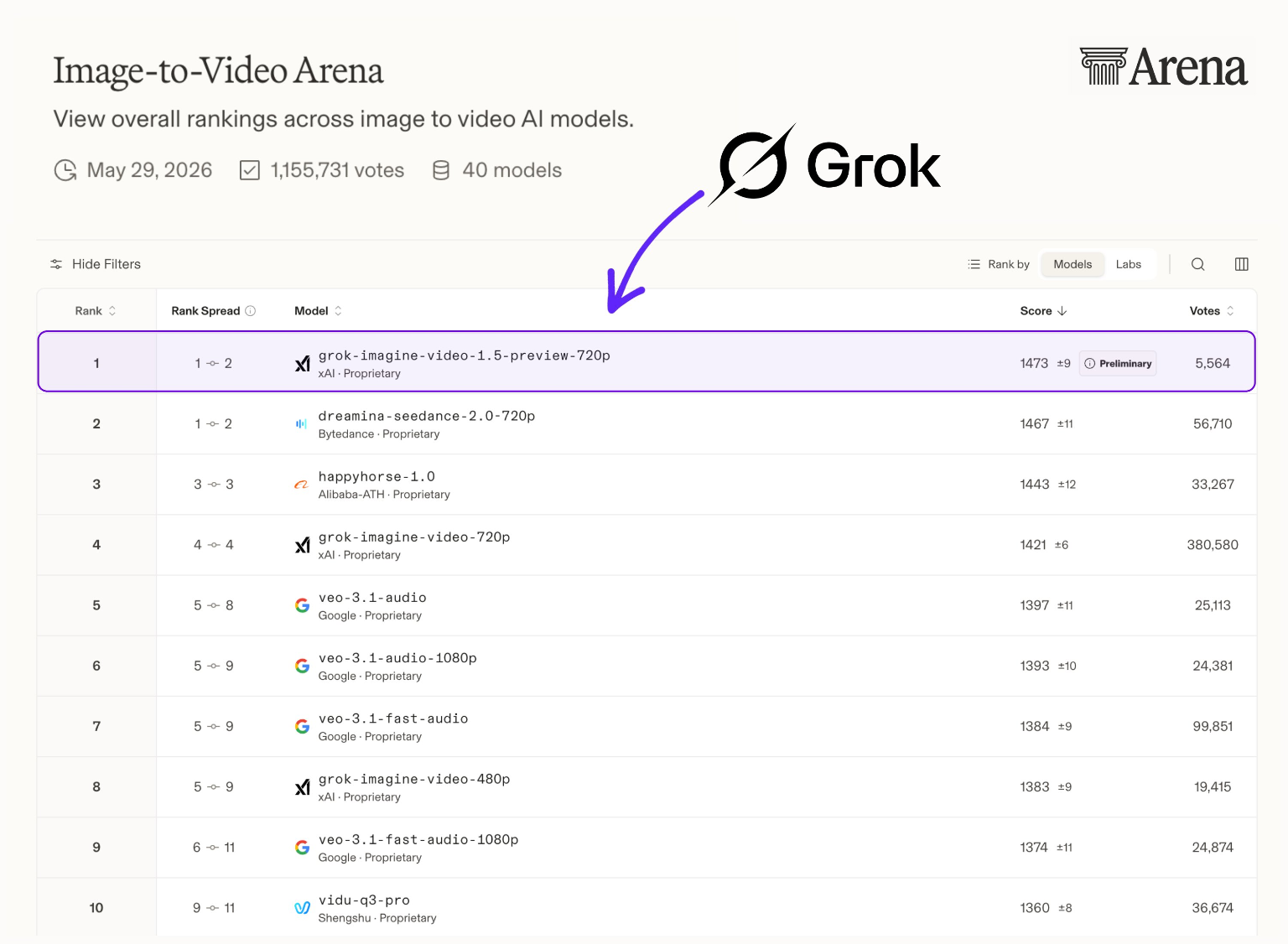
Grok-Imagine-Video-1.5-Preview (720p) ranks first on the Image-to-Video Arena leaderboard with a massive Elo rating jump, showcasing xAI's rapid execution and competitive edge over Seedance 2.0 and HappyHorse 1.0.