
Kling 3.0 Prompt-Leitfaden: Best Practices, Formeln & Beispiele (2026)
Datum: 10. Juni 2026 (Aktualisiert)
Autor: Jsam (Klingaio-Technikexperte)
Willkommen an der neuen Grenze der KI-Videogenerierung. Wenn Sie die rasante Entwicklung generativer Medien verfolgt haben, wissen Sie, dass Kling KI 3.0 die Landschaft grundlegend verändert hat. Die Zeiten der „Überraschungsgenerierung“, bei der Nutzer willkürliche Schlüsselwörter in ein Modell warfen und auf das Beste hofften, sind vorbei.
Mit der Veröffentlichung des Kling 3.0 Omni-Modells generieren wir nicht mehr nur Prompts, sondern wir regieren.
Nachdem wir Hunderte von bewegungsfokussierten Tests durchgeführt und die Ergebnisse auf Klingaio.com analysiert haben, haben wir den ultimativen Kling 3.0 Prompt-Leitfaden zusammengestellt. Egal, ob Sie Filmemacher, Vermarkter oder Content-Ersteller sind – dieses Tutorial liefert Ihnen die exakten Formeln und Copy-Paste-Beispiele, um kinoreife KI-Videos zu meistern.
Der Paradigmenwechsel: Von der Beschreibung zur Anweisung
Der größte Fehler, den Menschen bei KI-Videos machen, ist, sie wie für ein statisches KI-Bild (Midjourney/Flux) zu prompten. Kling 3.0 ist hervorragend darin, Zeit, Raum und Physik zu verstehen.
Um die besten Ergebnisse zu erzielen, müssen Sie aufhören, wie ein Fotograf zu denken, und stattdessen wie ein Kameramann (Director of Photography) denken. Sie müssen beschreiben, wie sich Dinge bewegen, nicht nur, wie sie aussehen.
Schlüsselfunktionen, die Sie jetzt steuern können:
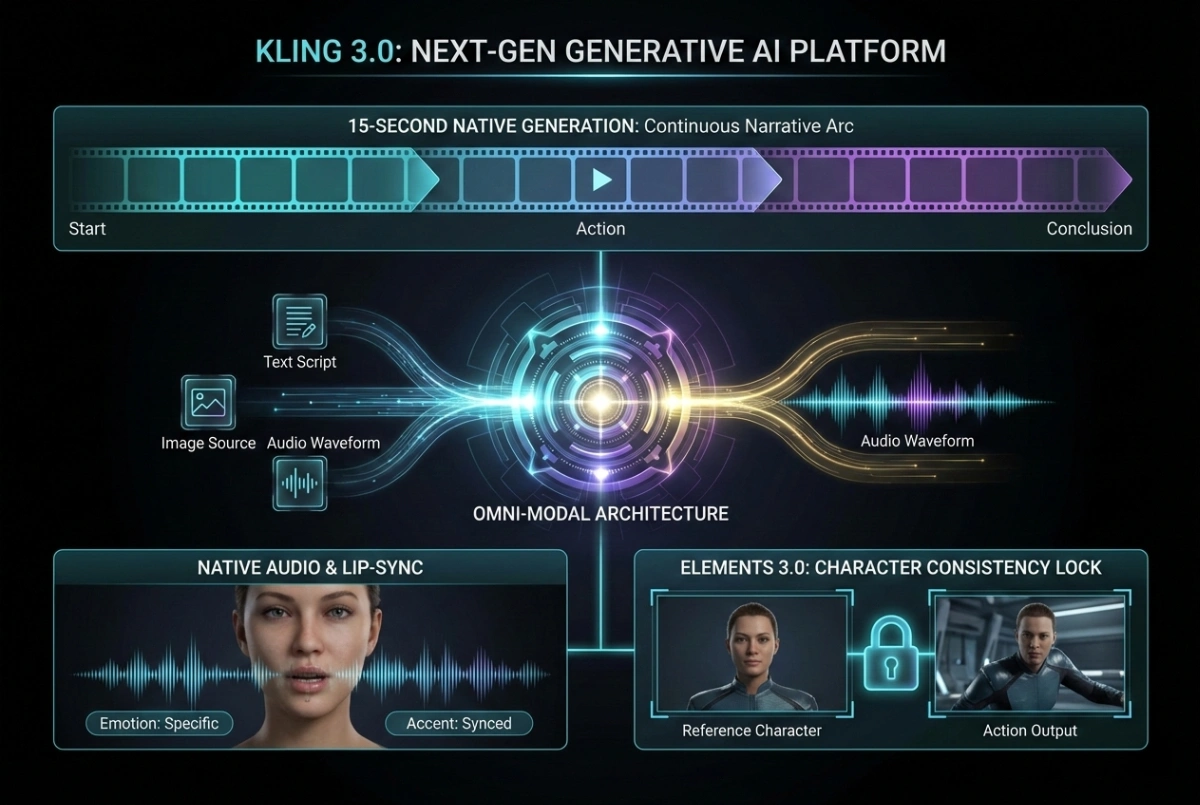
- 15-Sekunden-natives Narrativ: Schreiben Sie eine vollständige 15-Sekunden-Sequenz mit sich entwickelnden Aktionen in einem Prompt.
- Natives Audio & Lippensynchronisation: Weisen Sie Charakteren spezifische Dialoge und emotionale Töne zu.
- Kinoreife Bewegungssteuerung: Diktieren Sie exakte Kameraverhalten (Tracking, Schwenken, FPV).
- Elements 3.0: „Sperren“ Sie die Konsistenz von Charakteren mithilfe von Referenzbildern.
Die Meisterformel: Strukturierung Ihres Kling 3.0-Prompts
Durch strenge A/B-Tests auf unserem Kling 3.0 Generator hat sich eine klare „Gewinnerstruktur“ herauskristallisiert. Vermeiden Sie unstrukturierte „Wortsalate“. Übernehmen Sie stattdessen diese geschichtete Logik:
[Kamerabewegung] + [Subjekt- & Bewegungsphysik] + [Umgebung/Licht] + [Textur & Details] + [Audio/Emotion]
🏆 Ausgezeichnet: Schwache vs. starke Kling-Prompts
Um zu sehen, wie diese Formel in der Praxis funktioniert, betrachten Sie den Unterschied zwischen einem Anfänger-Prompt und einem Kling-optimierten Prompt:
| Element | Schwacher Prompt (Nicht verwenden) | Starker Kling 3.0-Prompt (Verwenden Sie dies!) |
|---|---|---|
| Kamera | Kamera folgt einem Mann | Handheld-Schulterkamera treibt hinter dem Subjekt her, mit leichtem Wackeln. |
| Bewegung | Ein Mann geht | Er geht in gleichmäßigem Tempo, jeder Fuß landet zuerst auf der Ferse, rollt dann ab. |
| Licht | Kinoreife Beleuchtung | Flackernde Neonlichter werfen magentafarbene und cyanfarbene Reflexionen auf den nassen Asphalt. |
| Textur | Sieht realistisch aus | Kondenswasser an der Fensterscheibe, sichtbarer Atem in der kalten Luft, Stoffglanz. |
5 fortgeschrittene Kling 3.0-Prompt-Beispiele (gebrauchsfertig)
Unten finden Sie fünf optimierte Prompt-Vorlagen, die darauf ausgelegt sind, die omni-modale Logik von Kling 3.0 zu testen. Kopieren Sie sie, passen Sie sie an und testen Sie sie direkt auf Klingaios Video-Generator.
1. Natürliche menschliche Bewegung (Beheben von „schlurfenden Füßen“)
Ziel: Realistische Gehphysik erzeugen, ohne den gefürchteten KI-Mondgang.
Tiefwinkel-Tracking-Aufnahme auf Straßenniveau. Eine Frau in einem beigen Trenchcoat geht in der Dämmerung durch eine regnerische Stadtstraße. Gleichmäßiges Tempo. Ihre Arme schwingen natürlich an den Seiten. Jeder Schritt landet zuerst auf der Ferse, rollt dann mit sichtbarer Gewichtsverlagerung ab. Der Bürgersteig ist nass und spiegelt verschwommene Neonstraßenlaternen. Auf 35mm-Film aufgenommen, geringe Schärfentiefe, realistische kinoreife Bewegung.
- Warum es funktioniert: Die Beschreibung der exakten Physik („Ferse zuerst“, „Gewichtsverlagerung“) zwingt das Modell, den Bodenkontakt zu berechnen, was schwebende oder schlurfende Füße verhindert.
2. Hochdynamische Action (dynamische Kamera)
Ziel: Hochgeschwindigkeitsbewegung und Interaktion mit der Umgebung testen.
Dynamische FPV-Drohnenaufnahme, die ein mattschwarzes futuristisches Motorrad durch einen Tokioter Highway-Tunnel bei Nacht jagt. Die Kamera peitscht und rollt sich 360 Grad, während sie dem Bike folgt. Das Bike neigt sich gefährlich tief in eine Kurve, Funken sprühen hell von den Fußrasten, die den Asphalt streifen. Hoher Kontrast, Bewegungsunschärfe im Hintergrund, der Fahrer bleibt scharf fokussiert.
- Warum es funktioniert: Die Verwendung von „FPV-Drohnenaufnahme“ und „rollt sich 360 Grad“ nutzt das überlegene räumliche Verständnis von Kling 3.0 und erzeugt aufregende, temporeiche Sequenzen.
3. Nativer Dialog & Lippensynchronisation (Mehrere Charaktere)
Ziel: Nutzung von nativem Audio und emotionaler Sprachführung.
Angespanntes Vorstandszimmer eines Unternehmens. Abwechselnde Halbnahaufnahmen, die sich auf die Sprecher konzentrieren.
[Charakter A: Älterer CEO, tiefe, kiesige, autoritative Stimme]: „Wir verkaufen das Unternehmen nicht. Heute nicht, nie.“
Sofort steht [Charakter B: Junger Rivale, scharfer, schneller, wütender Ton] abrupt auf und zeigt mit dem Finger: „Dann versenken Sie dieses Schiff mit allen an Bord!“
- Warum es funktioniert: Das explizite Markieren von Charakteren mit
[Charakter: Beschreibung, Stimmlage]stellt sicher, dass Kling das generierte Audio perfekt mit der korrekten Gesichts-Lippensynchronisation und den emotionalen Ausdrücken abgleicht.
4. Textrendering & kommerzielles Produkt
Ziel: Hoch lesbaren Text in einem Markenvideo platzieren.
Langsame Makro-Heranfahrt auf eine luxuriöse Kristall-Parfümflasche auf einem samtigen Sockel. Auf dem Glasetikett ist deutlich das Wort „ETTREAL“ in einer eleganten goldenen Serifenschrift eingeprägt. Sanftes Licht der goldenen Stunde erzeugt brechende Kaustiken auf dem Samt. Die Flasche dreht sich langsam um 45 Grad, sodass der Text „ETTREAL“ während der gesamten Bewegung perfekt stabil und lesbar bleibt.
- Warum es funktioniert: Die Aufforderung an das Modell, den Text während der gesamten Bewegung „stabil und lesbar“ zu halten, verhindert, dass der Text bei Kamerabewegungen morphiert.
5. Mehrere Einstellungen – narratives Geschichtenerzählen (15s)
Ziel: Eine kohärente 15-Sekunden-Geschichte mit deutlichen Kameraschnitten erzeugen.
Einstellung 1: Weite Einführungsaufnahme eines verlassenen Marskolonie-Gewächshauses während eines roten Staubsturms.
Einstellung 2: Schnitt zu einer Makro-Nahaufnahme eines kleinen grünen Sprosses. Eine behandschuhte Hand eines Botanikers berührt sanft das Blatt.
Einstellung 3: Aufnahme über die Schulter. Der Botaniker steht auf und blickt durch das verstärkte Glasfenster auf den Sturm.
Audio: Leises Summen der Lebenserhaltungssysteme, gedämpftes Heulen des Windes draußen. Kühle blaue Innenbeleuchtung.
- Warum es funktioniert: Kling 3.0 versteht explizite Aufnahmetrennungen (
Einstellung 1:,Schnitt zu:). Damit können Sie einen Mini-Film generieren, ohne externe Videobearbeitungsprogramme zu verwenden.
Fehlerbehebung: Beheben häufiger Kling 3.0-Artefakte
Selbst mit den besten Prompts kann die KI manchmal halluzinieren. So beheben Sie die häufigsten Probleme, die wir bei Klingaio sehen:
- So beheben Sie schwebende Hände/morphierende Finger:
- Die Lösung: Lassen Sie Hände niemals frei im leeren Raum schweben. Verankern Sie sie an einem Objekt. Schreiben Sie statt „Sie bewegt ihre Hände“: „Ihre Finger umfassen fest den Rand der Keramikkaffeeschale.“
- So beheben Sie ein „plastisches“ oder überglättetes Aussehen:
- Die Lösung: Fügen Sie physische Texturen zu Ihrem Prompt hinzu:
Filmkörnung, Hautporen, Schweiß, Stofffalten, Kondenswasser.
- Die Lösung: Fügen Sie physische Texturen zu Ihrem Prompt hinzu:
- Die Macht des Negativ-Prompts:
- Kling 3.0 standardmäßig auf perfekte, lächelnde Szenarien. Um einen rauen, realistischen Look zu erhalten, verwenden Sie immer Negativ-Prompts:
lächelnd, karikaturhaft, 3D-Render, glatte Plastikhaut, schwebende Gliedmaßen, schlurfende Füße, Textmorphing.
- Kling 3.0 standardmäßig auf perfekte, lächelnde Szenarien. Um einen rauen, realistischen Look zu erhalten, verwenden Sie immer Negativ-Prompts:
Fazit: Starten Sie noch heute mit dem Regieführen
Kling 3.0 ist kein bloßes Upgrade; es ist eine kreative Maschine, die einen neuen Workflow erfordert. Indem Sie sich von einfachen Beschreibungen lösen und eine „Regisseur-Denkweise“ annehmen – die Kamera, die Physik und das Audio steuern – können Sie atemberaubende Ergebnisse erzielen.
Der Schlüssel zur Beherrschung von KI-Videos liegt in der Iteration. Nehmen Sie sich die Meisterformel und die obigen Beispiele, gehen Sie zu Klingaio.com und generieren Sie noch heute Ihre erste filmreife Sequenz.
Häufig gestellte Fragen (FAQ)
F: Unterstützt Kling 3.0 Negativ-Prompts?
A: Ja. Negativ-Prompts werden in Kling 3.0 dringend empfohlen, um häufige KI-Artefakte wie schlurfende Füße, zusätzliche Finger oder unerwünschtes Morphing bei komplexen Bewegungen zu vermeiden.
F: Wie lang kann ein Kling 3.0-Video sein?
A: Kling 3.0 unterstützt nativ bis zu 15 Sekunden lange Videogenerierungen in einem einzigen Prompt, sodass mehrteiliges Geschichtenerzählen möglich ist, ohne das Video mehrfach verlängern zu müssen.
F: Welche ist die beste Sprache, um Kling KI 3.0 zu prompten?
A: Obwohl Kling mehrere Sprachen unterstützt, führt das Promoten auf Englisch derzeit zur genauesten Einhaltung komplexer filmischer Terminologie und Kamerabewegungen.
F: Ist Kling 3.0 kostenlos nutzbar?
A: Sie können Kling 3.0 mit anfänglichen kostenlosen Credits testen und Videos generieren, die auf Plattformen wie Klingaio verfügbar sind, was das Üben Ihrer Prompt-Fähigkeiten erleichtert.